![NextMinute_Primary_White.svg]](https://support.nextminute.com/hubfs/NextMinute_Primary_White.svg)
Step 1: Open the charge details
-
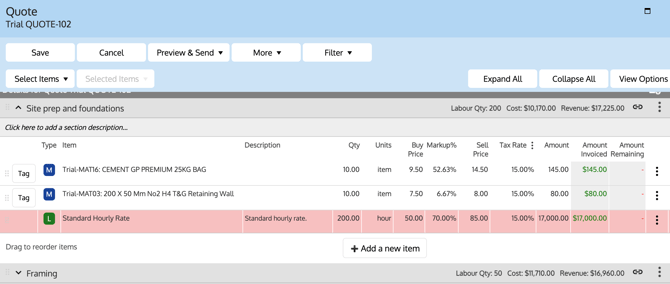
Navigate to Invoices, Quotes, or the Sections View of Charges where the labour charge appears.
-
Locate the Labour charge line item.
-
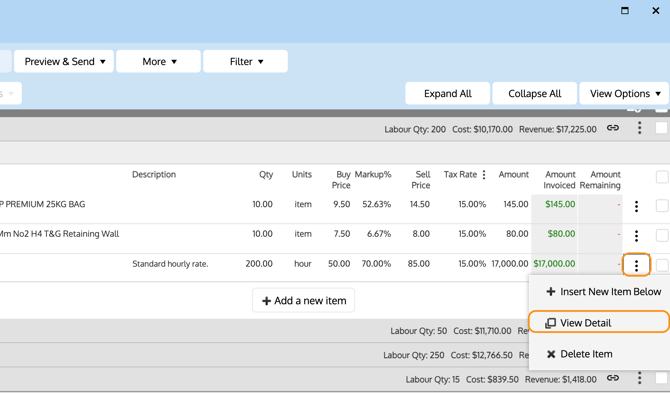
Select the 3 dots next to that line item.
-
Select View Detail to open the charge details.
Step 2: Make the labour charge not billable
-
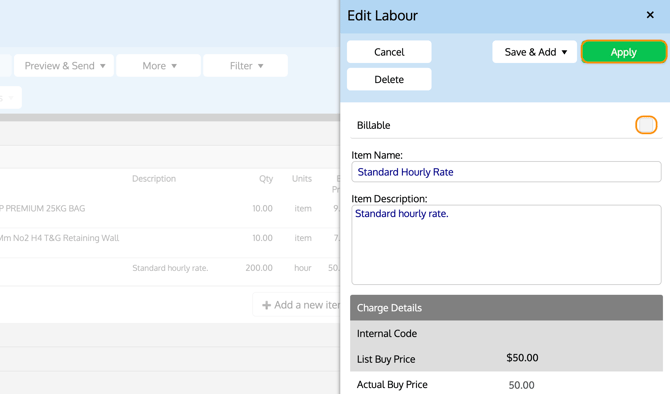
Find the Billable checkbox within the charge details.
-
Untick Billable.
-
Select Apply to save your changes.
💡Your charge within your quote or invoices will now appear with red highlight to signal it's non-billable.