![NextMinute_Primary_White.svg]](https://support.nextminute.com/hubfs/NextMinute_Primary_White.svg)
Step 1: Switch to Dark mode
- Open up the NextMinute app and click on the NEXTMINUTE logo
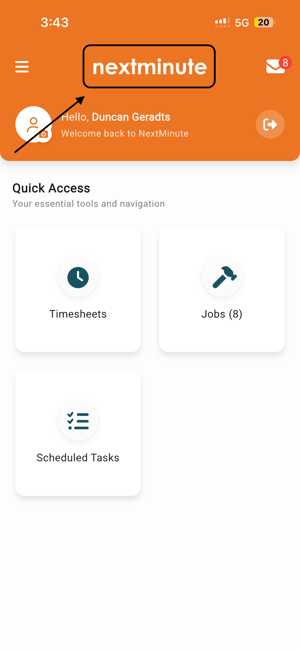
Step 2: Enjoy Dark Mode
- After tapping the logo you should be in dark mode, like below

Step 3: Switchback to standard view
- You can switch by to standard view by clicking on the NEXTMINUTE logo again
Tips
- This setting is per-device — each team member controls their own display preference independently.
- If you cannot see job titles or other text clearly, switching to Standard View may help.
- This toggle is not found in the phone's system settings or the app's settings menu — it is only accessible via the menu screen logo.