![NextMinute_Primary_White.svg]](https://support.nextminute.com/hubfs/NextMinute_Primary_White.svg)
Short answer: NextMinute does not have a dedicated, automated retention feature. Retentions are handled by adjusting your invoice manually and are ultimately tracked in your accounting software. The best approach to do this in NextMinute is listed below.
Step 1: Build your payment claim as normal
Create the invoice like you normally would, either from Charges or from a Quote.
Step 2: Add the retention as a deduction line
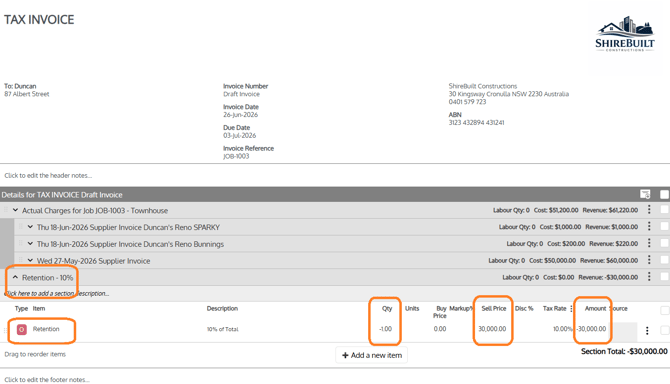
Add a line at the bottom of the invoice as an Other Item that deducts the retention amount (a negative line). This is the correct way to show the retention being withheld from the current claim.
When doing this you will need to make sure the quantity for the retention is negative (for example -1) and a positive sell price for the item is a positive number (for example $30,000.00). This will still result in a negative amount and won't cause any issues when syncing to Xero.
Step 3: Sync the Invoice and send
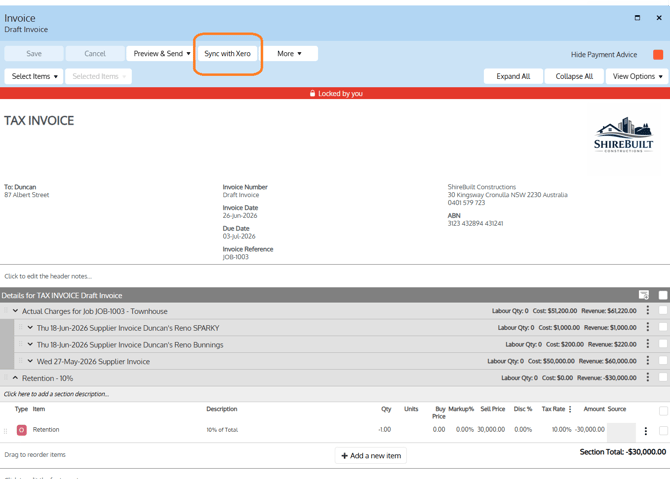
Sync the invoice with your accounting package (Xero or MYOB) to give the invoice it's invoice number. Then hit Send to send the invoice to the customer.
Step 4: Claim the retention back at the end of the job
When the retention becomes due, manually add the retention amount to a later invoice to claim it back. There is no automatic release, so this step is done by hand at the appropriate milestone.
FAQ
Does NextMinute have a built-in retention function? No. There is no automated retention feature. You record retentions manually using one of the methods above, and track the held amount in Xero.
How do I get the retention back? There's no automatic release. When the retention is due, manually add the amount to a later invoice to claim it.